Resume
A conversation with

Mayank Jain, product designer.

I make complex digital products feel obvious.

10+ years in B2B, SaaS & Enterprise · Product Strategy · Design systems · AI-assisted workflows
Q.01What have you shipped?
{{ p.title }}
case-{{ p.id }}.mp4
{{ p.n }} — {{ p.client }}Coming soon {{ p.title }} {{ p.line }}
{{ p.metric }}{{ p.metricLabel }}
Case study coming soon Read the case study on Behance

{{ p.summary }}

My role

{{ p.role }}

Q.02How does AI fit into your workflow?
{{ u.toolsLabel }} {{ u.who }} {{ u.detail }}
Q.03Who can vouch for you?

“He consistently makes projects better, no matter the context or domain.”

Kevin Marvinac VP Strategy & Operations — ShipBob Full recommendation ↗

“Mayank’s ability to blend technical skill with a deep understanding of client needs sets him apart as a true asset in the UX design field.”

Tapesh Gosain Director — Accenture Full recommendation ↗

“What stood out was his ability to combine strong user research with thoughtful design execution.”

Nikhil Yadav Director, AI Product — ShipBob Full recommendation ↗
About

Hi, I'm Mayank.

Product designer with 10+ years across B2B, SaaS and enterprise products. Most recently in logistics and fulfillment at ShipBob.

I design digital products end to end, from discovery to launch, with my deepest work in operational software: order management, warehouse tools, rate cards and tracking pages.

Q.01Where did you start?

In animation, visual effects and graphic design. That grounding in craft is what I now bring to simplifying complex flows.

Q.02Where have you worked?
{{ x.company }}{{ x.role }} · {{ x.years }}

{{ x.desc }}

Q.03What do you value in design?
i.Clarity under pressure

People using operational tools are busy and mid-task. The screen should make the next action obvious, even with a thousand orders on it.

ii.Design every path

The happy path is the easy part. Errors, edge cases and empty states are where products earn trust, so I map them before I draw anything.

iii.Systems over screens

A good pattern solves a problem once for every team. I design components and rules that keep products consistent as they grow.

iv.Prove it shipped well

Design isn’t finished at launch. I set a baseline, track adoption and support load, and bring the numbers back into the next iteration.

Work

Case studies.

Deep dives into recent B2B work: the problem, my role, and what changed after launch.

Q.01Which case studies should I read first?
{{ p.title }}
case-{{ p.id }}.mp4
{{ p.n }} — {{ p.client }}Coming soon {{ p.title }} {{ p.line }}
{{ p.metric }}{{ p.metricLabel }}
Case study coming soon Read the case study on Behance

{{ p.summary }}

My role

{{ p.role }}

Q.02What else have you worked on?
{{ p.title }}
case-{{ p.id }}.mp4
{{ p.n }} — {{ p.client }}Coming soon {{ p.title }} {{ p.line }}
{{ p.metric }}{{ p.metricLabel }}
Case study coming soon Read the case study on Behance

{{ p.summary }}

My role

{{ p.role }}

{{ w.meta }} {{ w.client }} {{ w.domain }}
Ask me about it ↗
Case study 01 · ShipBob · Merchant app

Order management revamp

Rebuilding the order dashboard merchants use every day to run fulfilment, from ingestion through completion.

RoleSolo Product designer
TeamProduct Managers (D2C & B2B), engineering, marketing and operations
UsersD2C and B2B merchants; internal implementation, success and sales teams
SurfaceOrder listing, order details, filters, bulk actions
TL;DR§01 · The quick read
a.Problem

The order dashboard was designed for simple D2C orders: one order, one shipment. As B2B order types, split shipments and new exception statuses were added on top, merchants could no longer tell what needed their attention. The legacy platform underneath made every fix slow and risky to ship.

b.What I did

Led design from knowledge transfer to beta: research with merchants and internal teams, a two-level status model, a shipment drawer and new filters, validated in two rounds of testing.

c.Result

Common jobs 50–72% faster after GA. Fifteen exception reasons now roll up into one status, and the page runs on the new micro-frontend.

§02OverviewWhat we set out to fix

ShipBob’s order dashboard was built for a simple D2C flow: one order in, one shipment out. Over time B2B arrived — EDI, dropship, API, manual and FBA orders — and was fitted into the same screens.

Orders started splitting across fulfilment centres, and exception handling grew into a pile of one-off statuses. Merchants use this screen every day to answer urgent questions, and it had stopped answering them quickly. I led design across discovery, ideation, validation, build support and beta launch.

Problem statementThree questions merchants ask this screen constantly, and what the old dashboard did with each.
Q1“What needs me right now?”Exceptions were spread across unrelated statuses with inconsistent naming. Merchants built workarounds — fake SKUs, saved filters, sticky notes — to find orders that needed action.
Q2“How did this order split?”An order fulfilled from three locations appeared as unrelated rows. One merchant described a customer buying 30 of a single SKU, splitting into 30 shipments, and losing visibility entirely.
Q3“Where is it, and what did it cost?”Every detail check meant leaving the list and loading a new page. Filtering meant scrolling a long list with the next step hidden below the fold.
Platform constraintAnd a constraint underneath all three

The page ran on the legacy PhotoPrint / Merch App stack, so new features were slow and risky to build. Feature requests were piling up with no clear path to implementation.
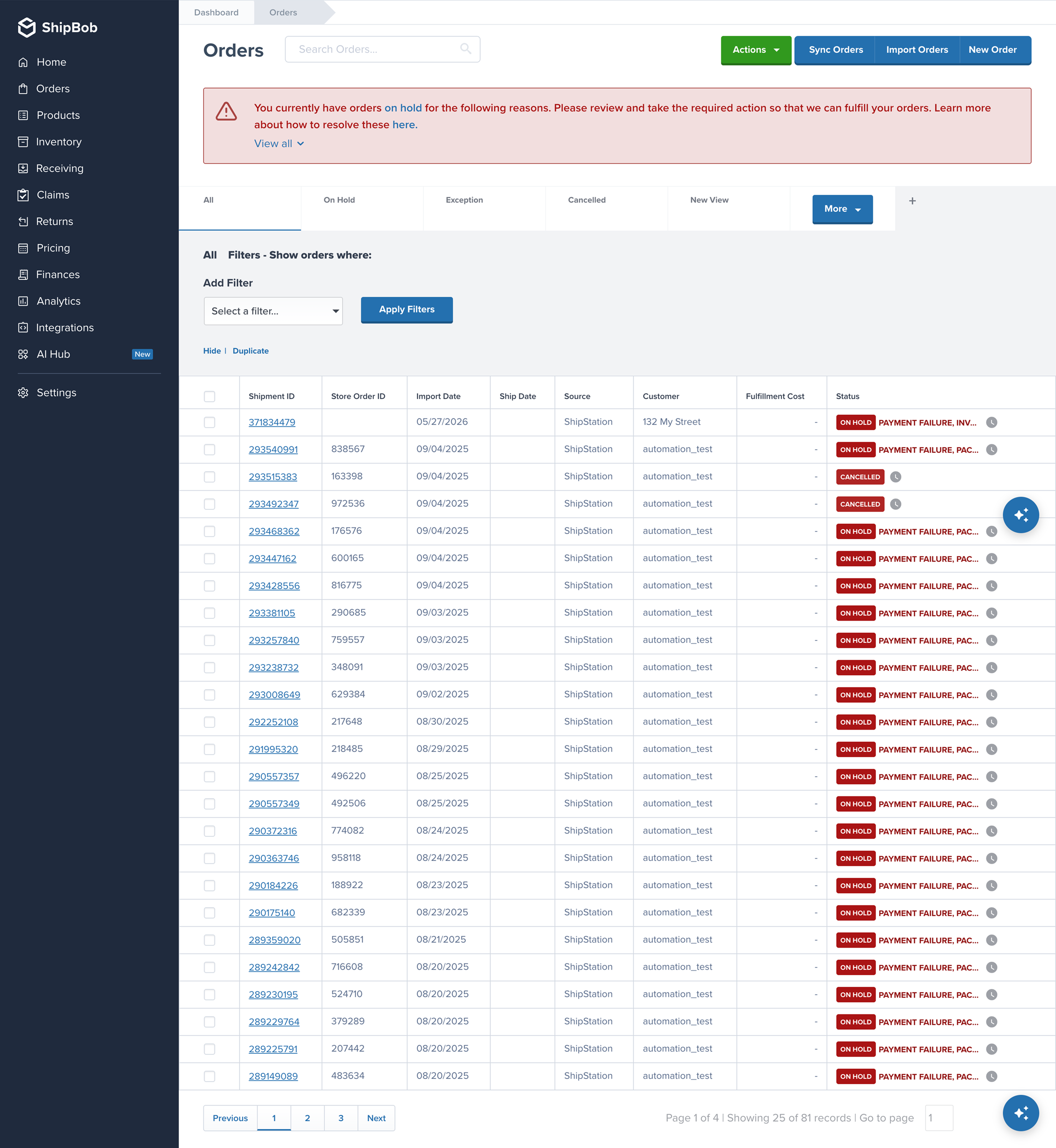
The old orders page
Before — the old orders page

“The current filter view scrolls forever — you just scroll and then you can’t remember what you already saw.”

Merchant, during stakeholder interview
§03Strategy & processFive phases, from knowledge transfer to launch
i.Discovery and researchUnderstand how merchants manage orders from post-ingestion through completion, and where the current experience breaks.
01Ran a knowledge-transfer session with PMs to map the current order management process.
02Analysed past merchant and internal calls to build a coding document — the areas to probe, and the feedback worth re-validating against the new scope.
03Interviewed D2C and B2B merchants across SMB, mid-market and growth, plus internal implementation, merchant success, sales and growth teams.
04Synthesised the interviews into personas and jobs to be done.
05Ran a competitive analysis of how the industry handles order state, splits and exceptions.
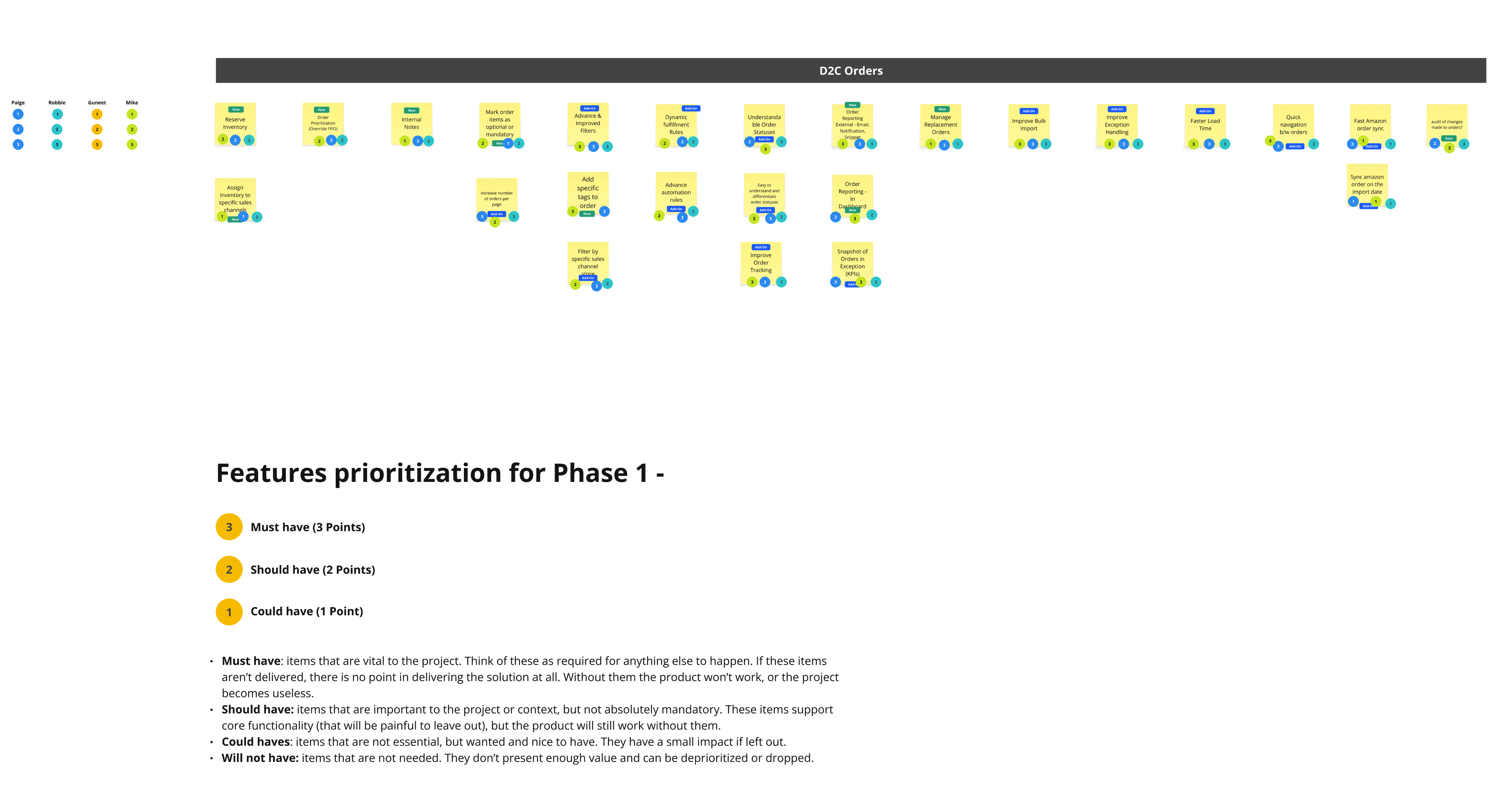
06Facilitated a feature prioritisation session with PMs and cross-functional partners to lock Phase 1 scope, then wrote detailed use cases against it.
Key personas
CEO / CFO / COO / CMO / OwnerBusiness operationsFocus areas
  • Fulfilment cost
  • Business growth
  • Shipping revenue
  • Shipment and order velocity
  • Which SKUs sold today, against marketing promos
Logistics head / supply chain managerDaily order managementMain tasks
  • Hit a high SLA rate
  • Control cost, by sales channel
  • Get fulfilment statuses and item quantities for the day
  • Check exception and on-hold orders, resolve, get them shipped
  • Create B2B orders from a PO and shipping plan
Customer supportOrder enquiriesMain tasks
  • Check shipping status to answer “where is my order”
  • Create a replacement order
  • Update and edit order information
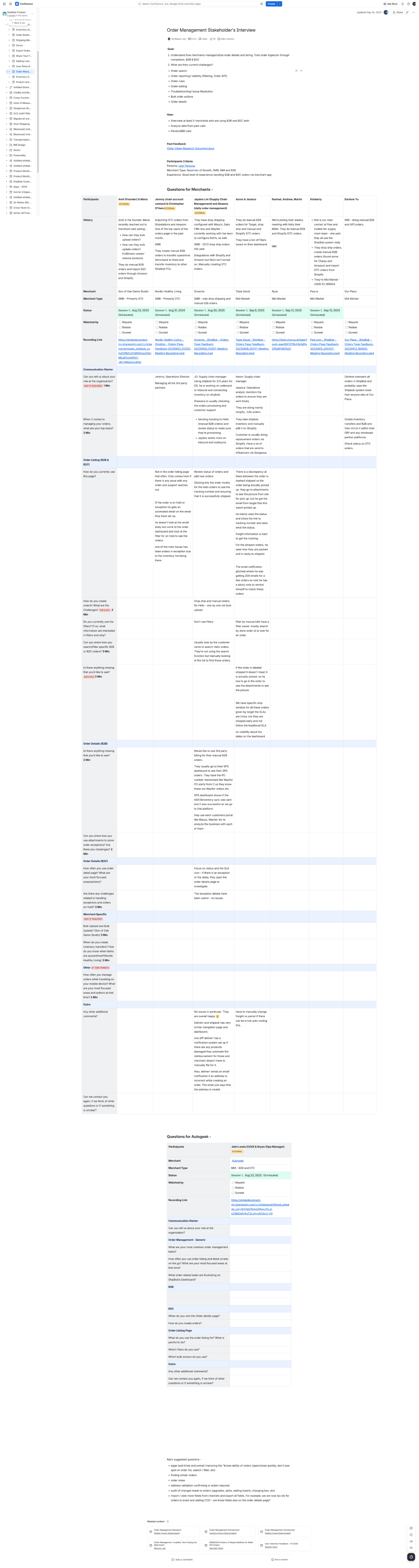
Stakeholder interview coding doc
Interview coding doc — merchants and internal teams
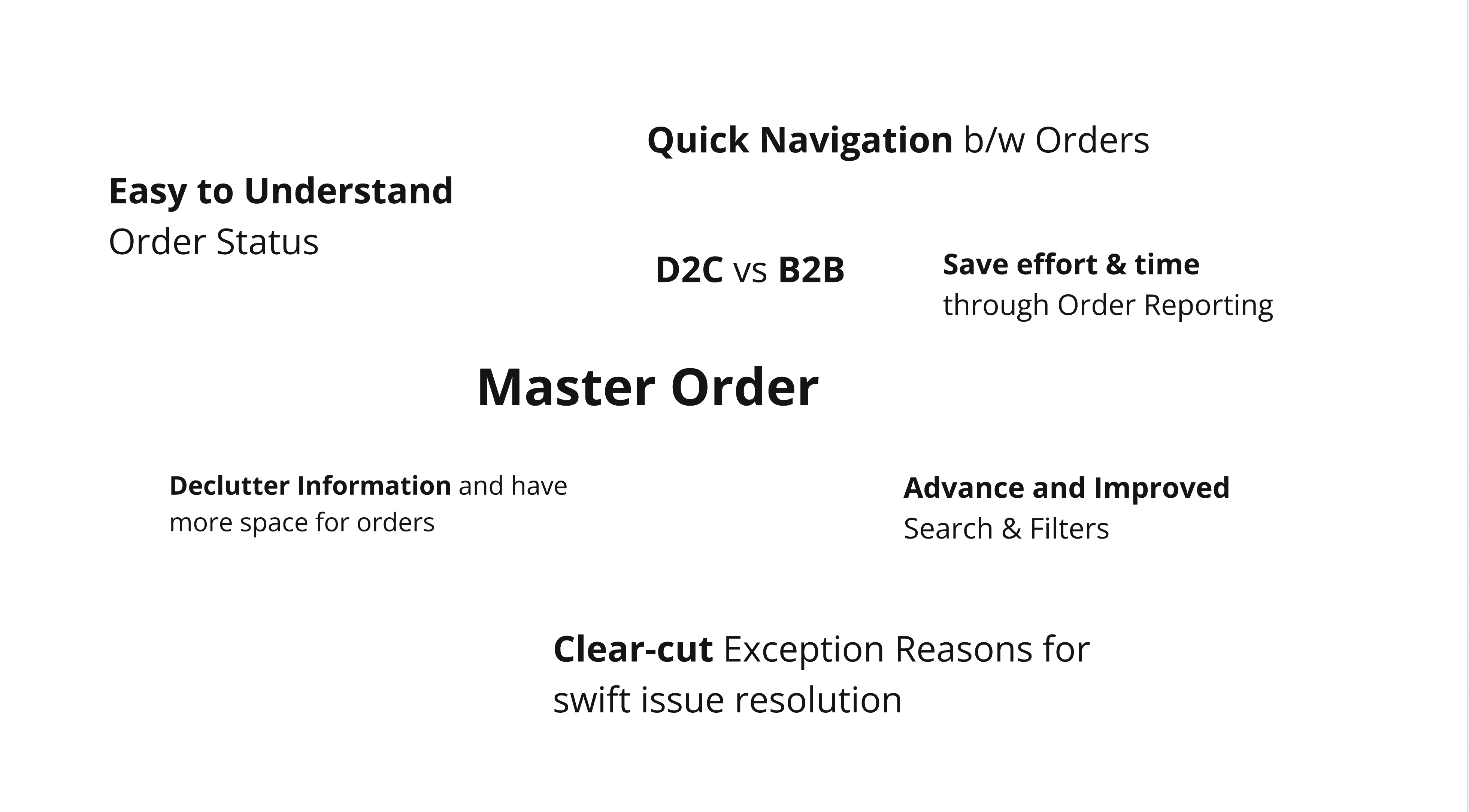
Research themes
Research synthesis — key themes
Feature prioritisation board
Feature prioritisation for Phase 1
ii.IdeationTurn the findings into one structure that holds both D2C and B2B.
01Mapped user flows for every B2B order type — EDI, dropship, API, manual and FBA — with the B2B PM.
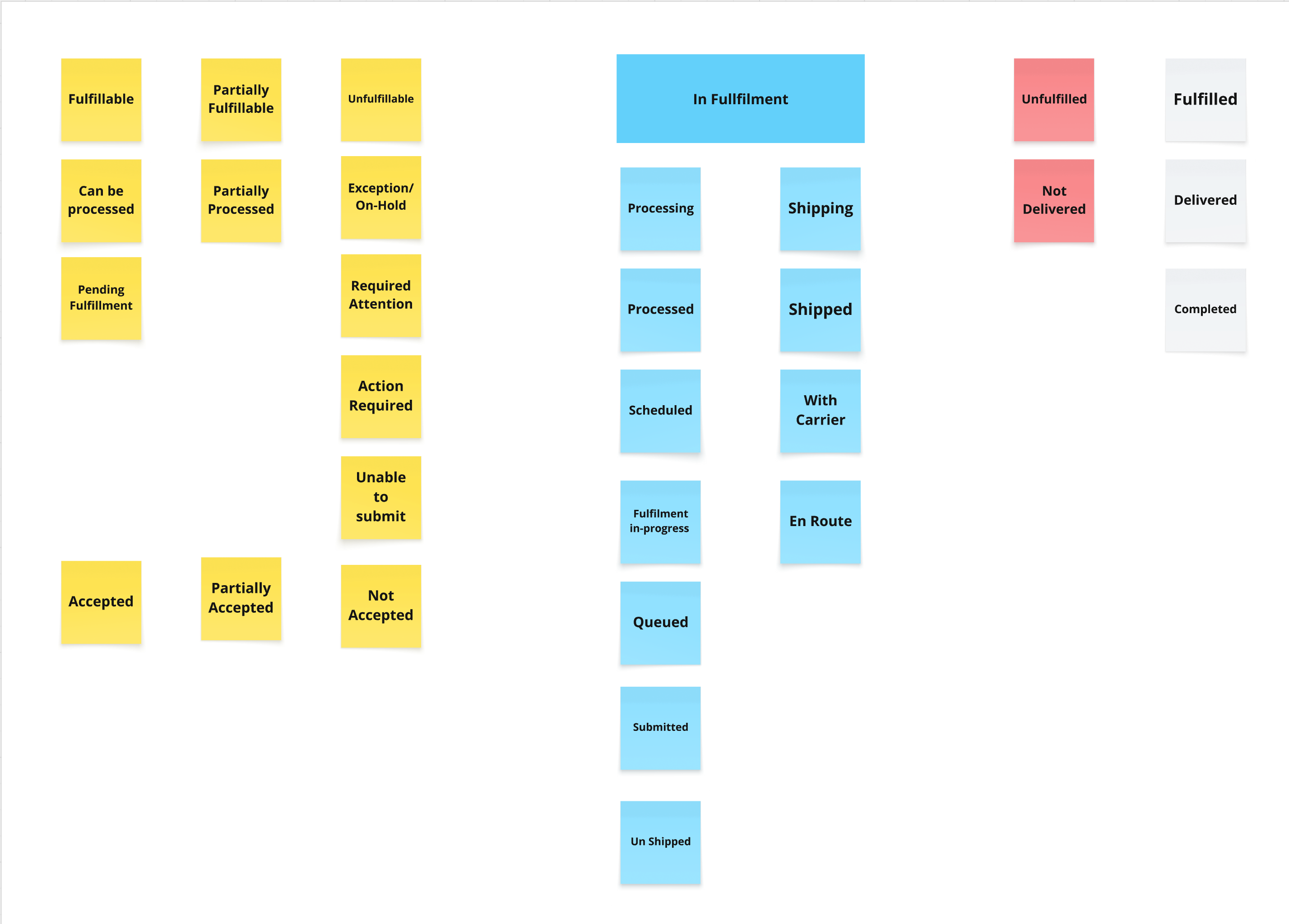
02Proposed re-organising order statuses, consolidating scattered exception states under one category so they could be seen, counted and filtered together.
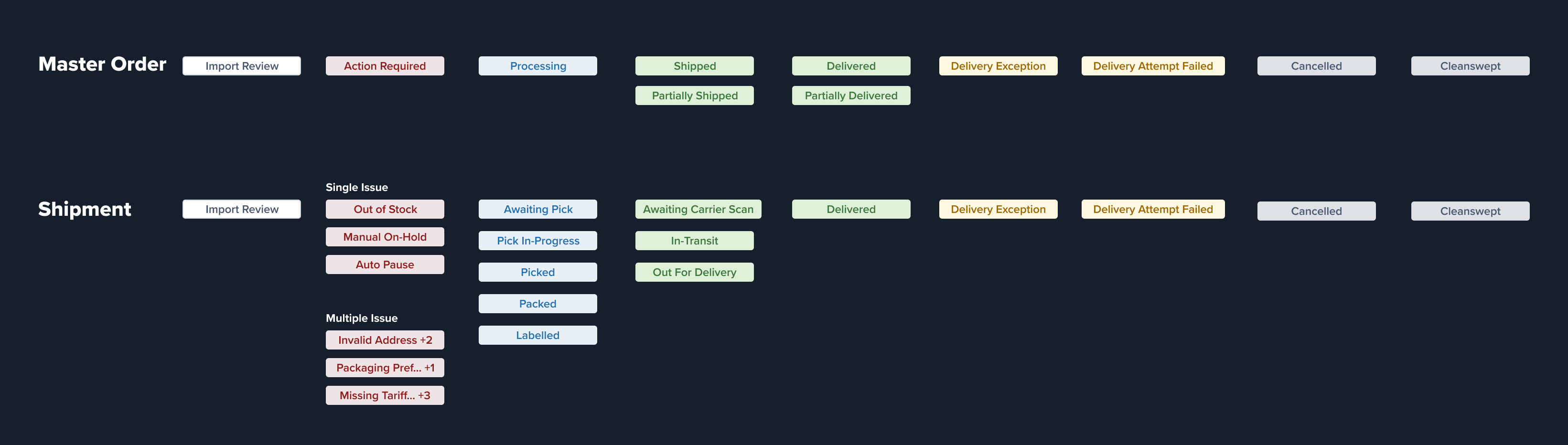
03Developed concepts for status at two levels — master order and shipment — and took stakeholders through them to secure buy-in.
04Decoupled and regrouped the underlying data for statuses, filters and bulk actions to fit the new structure.
05Produced prototypes for the recommended flow.
Status regrouping board
Regrouping scattered statuses
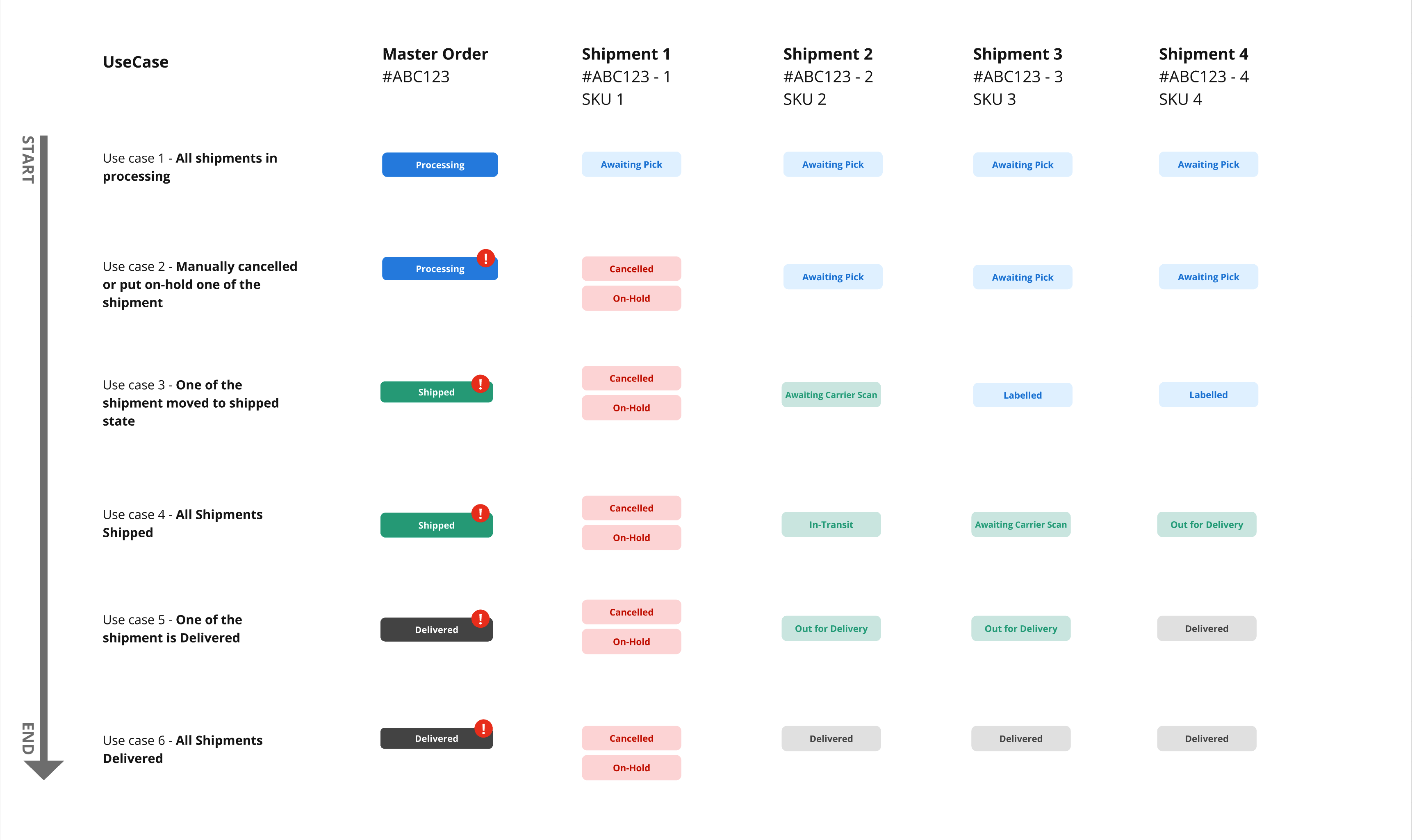
Master and shipment status concept
Status at master and shipment level
B2B order type flows
User flows across B2B order types
iii.ValidationTest the structure before it reached engineering — internally first, then with merchants.
01Built prototypes and a coding doc to A/B test with internal teams — implementation consultants, merchant success managers and sales engineers. Test areas: old vs new filter panel, statuses at master and shipment level, the master and shipment views, and the new shipment drawer.
02Worked with the PM to recruit merchants across SMB, mid-market and growth, with a mix of D2C and B2B accounts — then set the success criteria and session structure.
03Moderated one-to-one think-aloud sessions of 30–45 minutes, with tasks run in sequence and no leading prompts.
04Synthesised both rounds into common themes.
What came back
↓The new filter panel cut the time to apply filters against the previous long, scrolling list.
↓The shipment drawer cut the clicks needed to see order details.
↓Core tasks such as resolving an on-hold order completed faster.
↑Seeing an order’s splits together improved scan-ability of the whole page.
iv.ImplementationKeep what was tested intact through the build — onto the new micro-frontend.
01Delivered the final mockups, detailing every flow and interaction.
02Ran walkthroughs with engineering so flows and interaction detail were clear before work started, and stayed close through the build.
03Reviewed the front-end implementation on the new MFE and logged the fixes needed.
v.LaunchGet merchants into a substantially changed screen without a support spike.
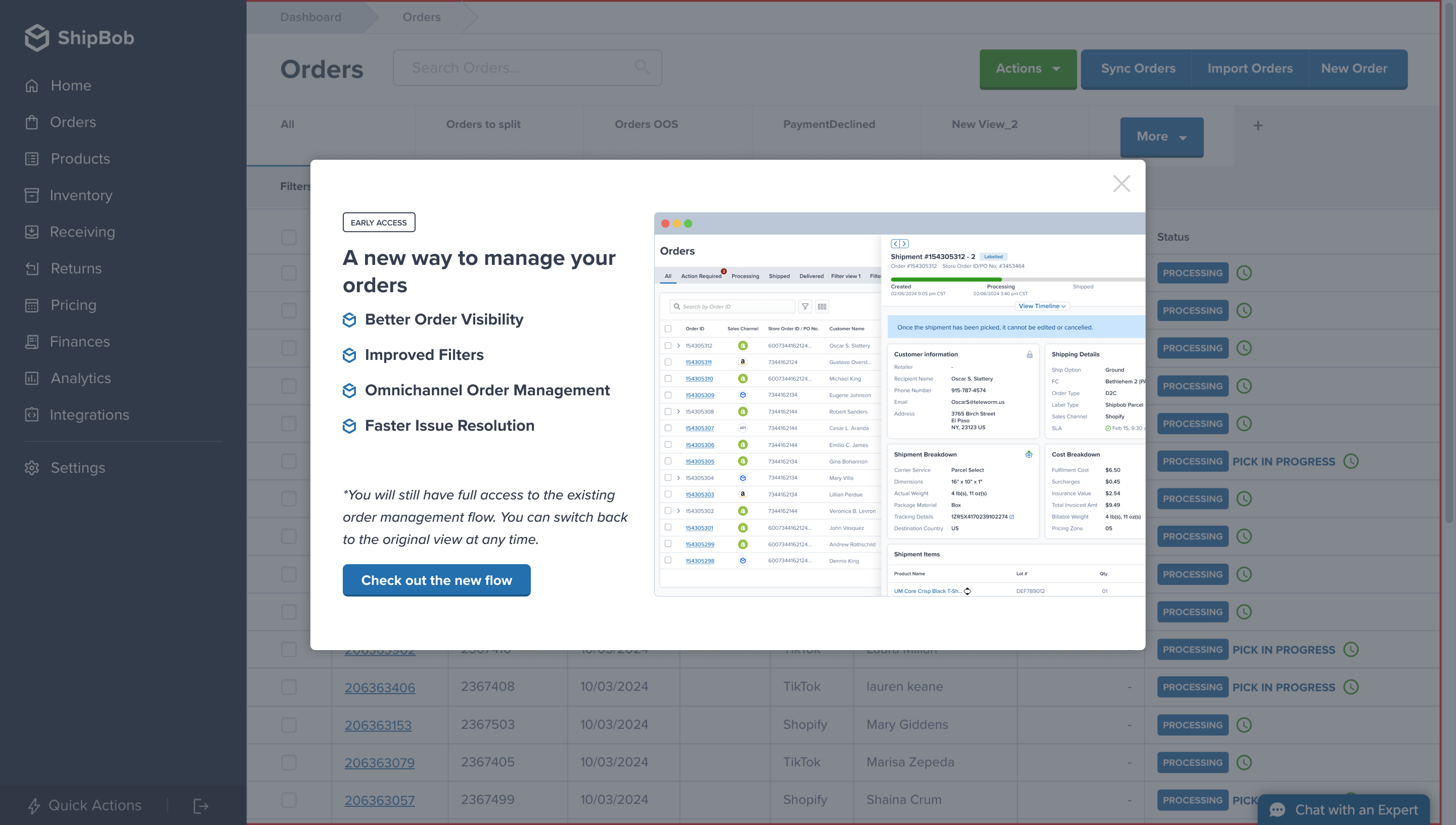
01Built the beta launch approach with marketing and operations, designing the in-product Pendo guide and adding the screens into Pendo.
02Defined the KPI set to quantify the design investment, tracked with the PM after GA.
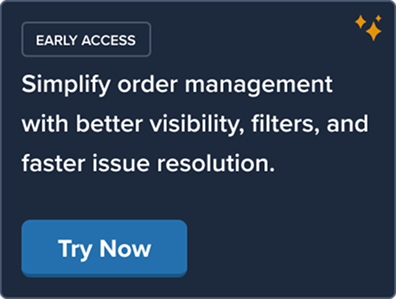
Early access banner inviting merchants to try the new orders page
Early-access opt-in banner
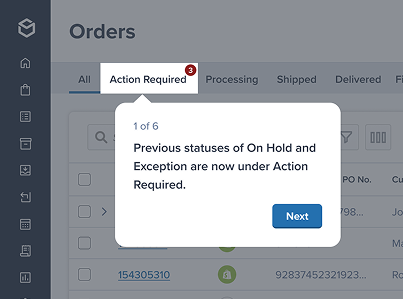
Pendo guide step explaining the new Action Required tab
Pendo walkthrough — 6 steps on first visit
Pendo guide screens
In-product guide for the beta
§04OutcomeFive themes from research, and what each became
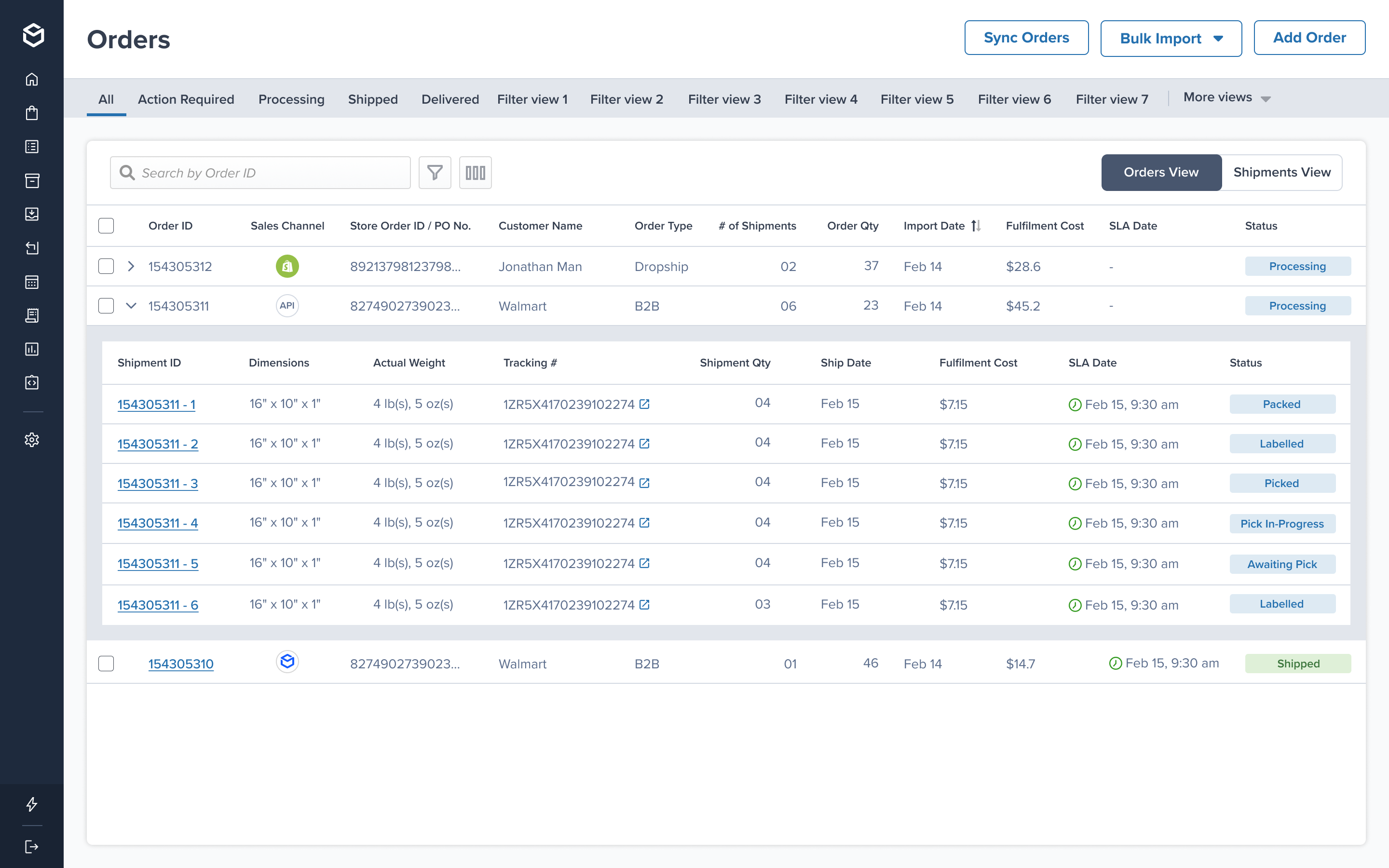
What merchants asked“Help me understand how my order is split.”Master orders and shipmentsOne row per order, with its shipments nested beneath it. Status resolves at both levels, so a merchant can see a partly shipped order without opening it. Participants confirmed the relationship was readable on first encounter.
Master orders with nested shipments
Master order with shipments nested beneath
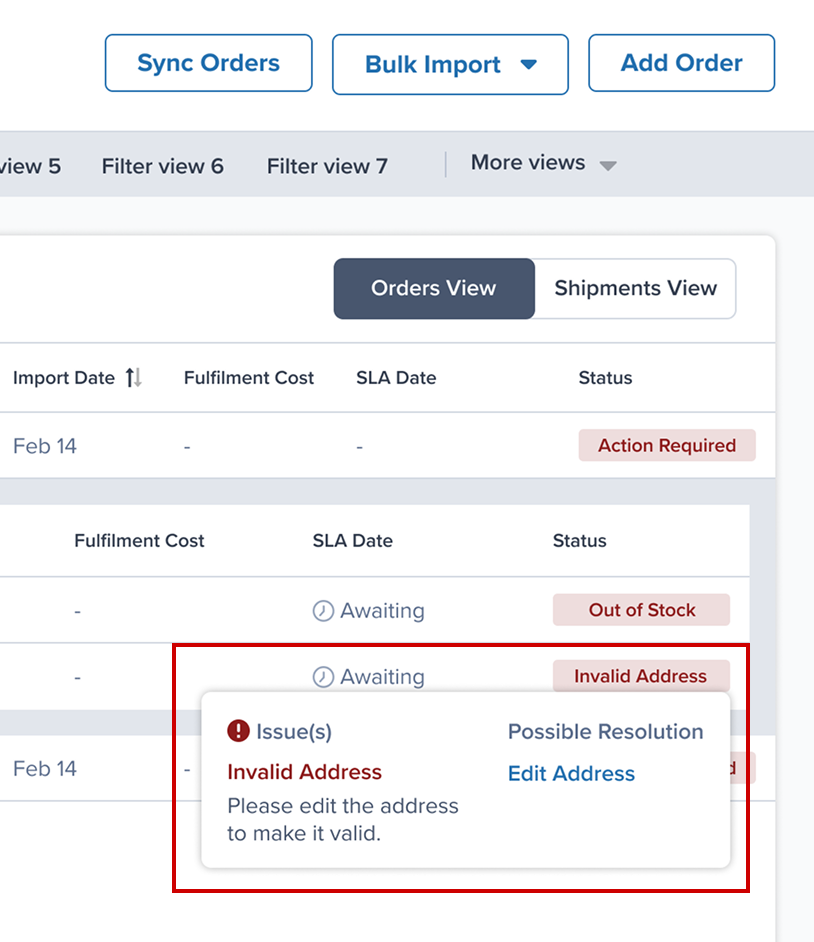
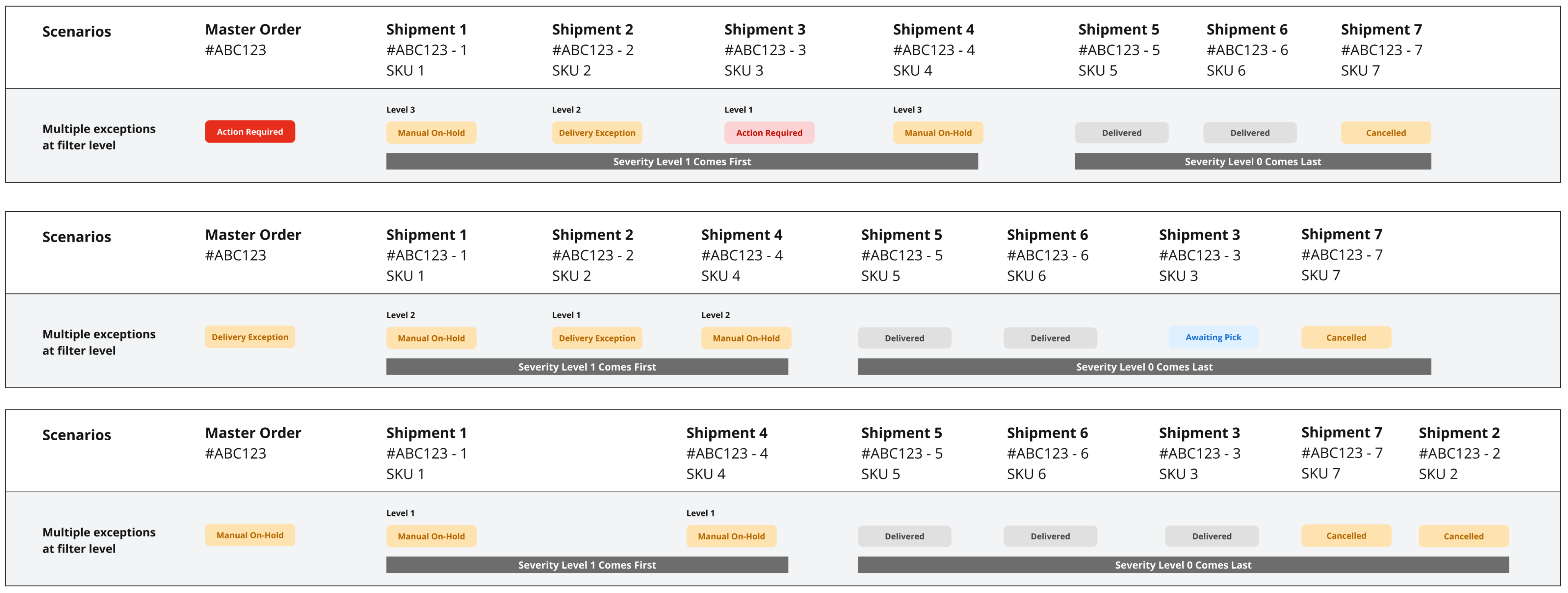
What merchants asked“Let me understand and resolve exceptions faster.”One status, at both levels — not fifteenMaster order and shipment status both resolve through the same model. Fifteen scattered exception reasons now roll up into a single Action Required status, alongside two new fulfilment states added for the granularity merchants asked for.
Status tooltip in the list showing the issue, Invalid Address, and its possible resolution, Edit Address
Issue and fix, on hover in the list
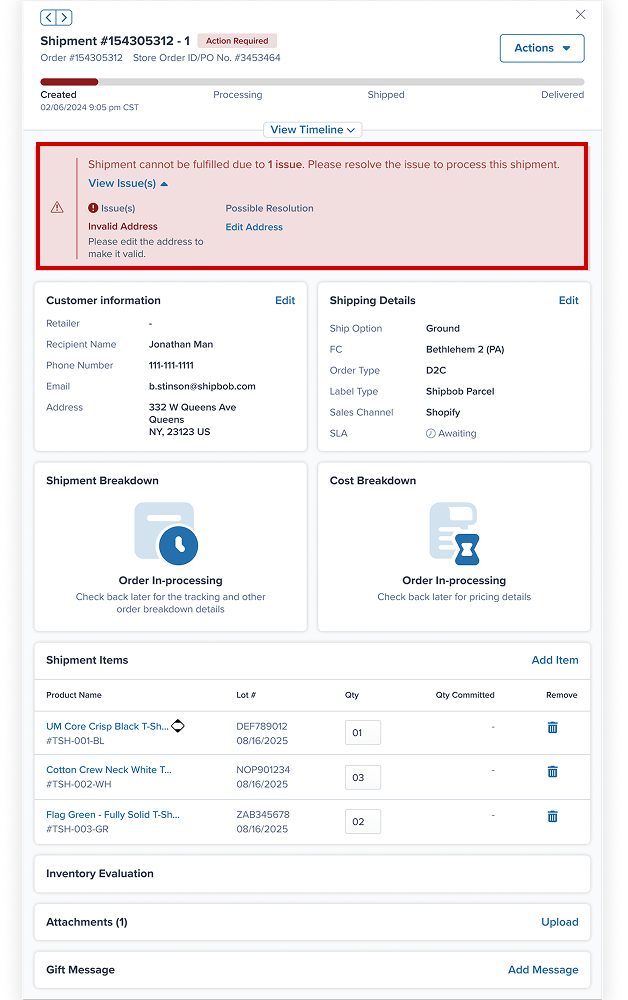
Shipment drawer with an Action Required banner listing the issue and a resolution link
The same issue, resolvable from the shipment drawer
What “Action Required” now covers — 15 reasons, one status
Internal Transfer in ProgressInvalid AddressInventory in QuarantineMissing Tariff InformationOut of StockPackage Preference Not SetPartially CommittedPayment DeclinedReserve Date Not MetUnknown SKUManual On-HoldAuto Processing PauseInternational HazmatDestination-Based Fulfilment RuleInactive SKU
The status model that shipped
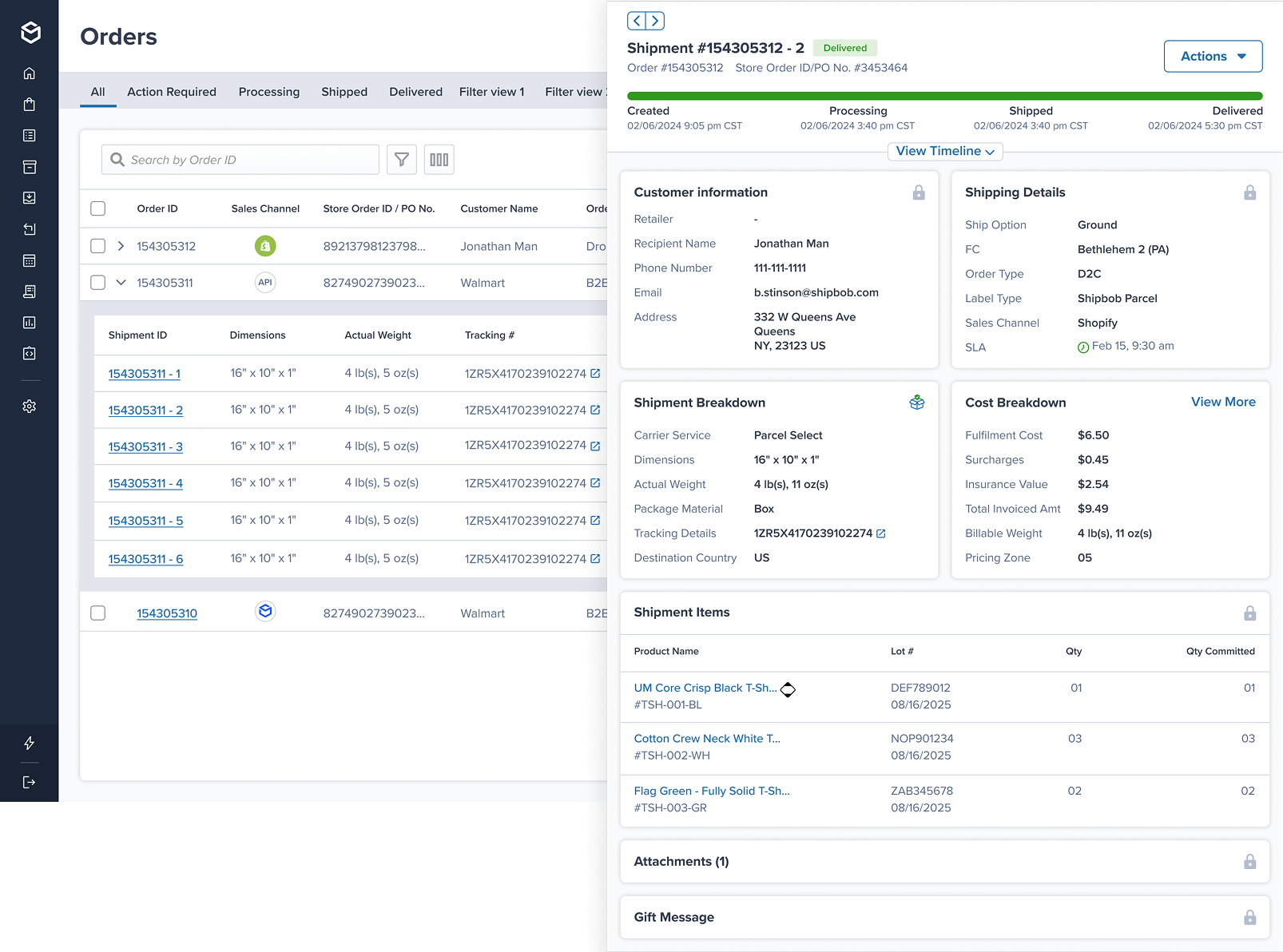
What merchants asked“Get me to order details more easily.”Shipment drawerDetails open in a drawer over the list instead of a new page — cost breakdown, dims and weight, lot information, item-level issues and the timeline. One participant’s first reaction was that they no longer had to leave the page.
Shipment drawer open over the orders list, showing status timeline, customer, shipping, shipment and cost breakdowns, and shipment items
Shipment drawer, open over the list
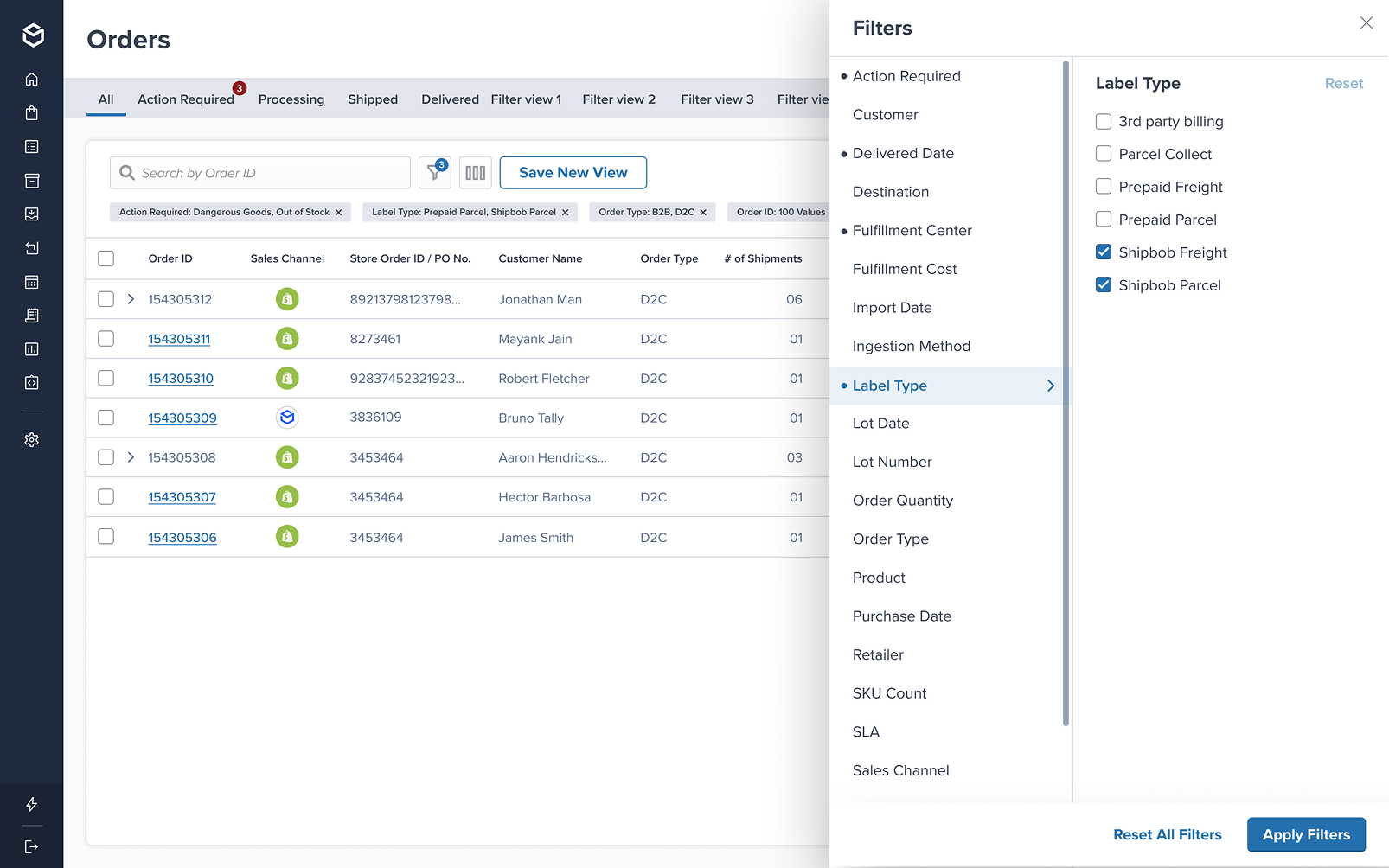
What merchants asked“Make filtering and searching easier.”Improved and advanced filtersTwo filter panels went into testing. The version that showed all options at once, updated result counts as filters were added, and needed less scrolling was preferred by every participant who saw both.
Filters drawer with Label Type selected, applied filter chips above the orders list and a Save New View button
The new filter panel, applied-filter chips and saved views
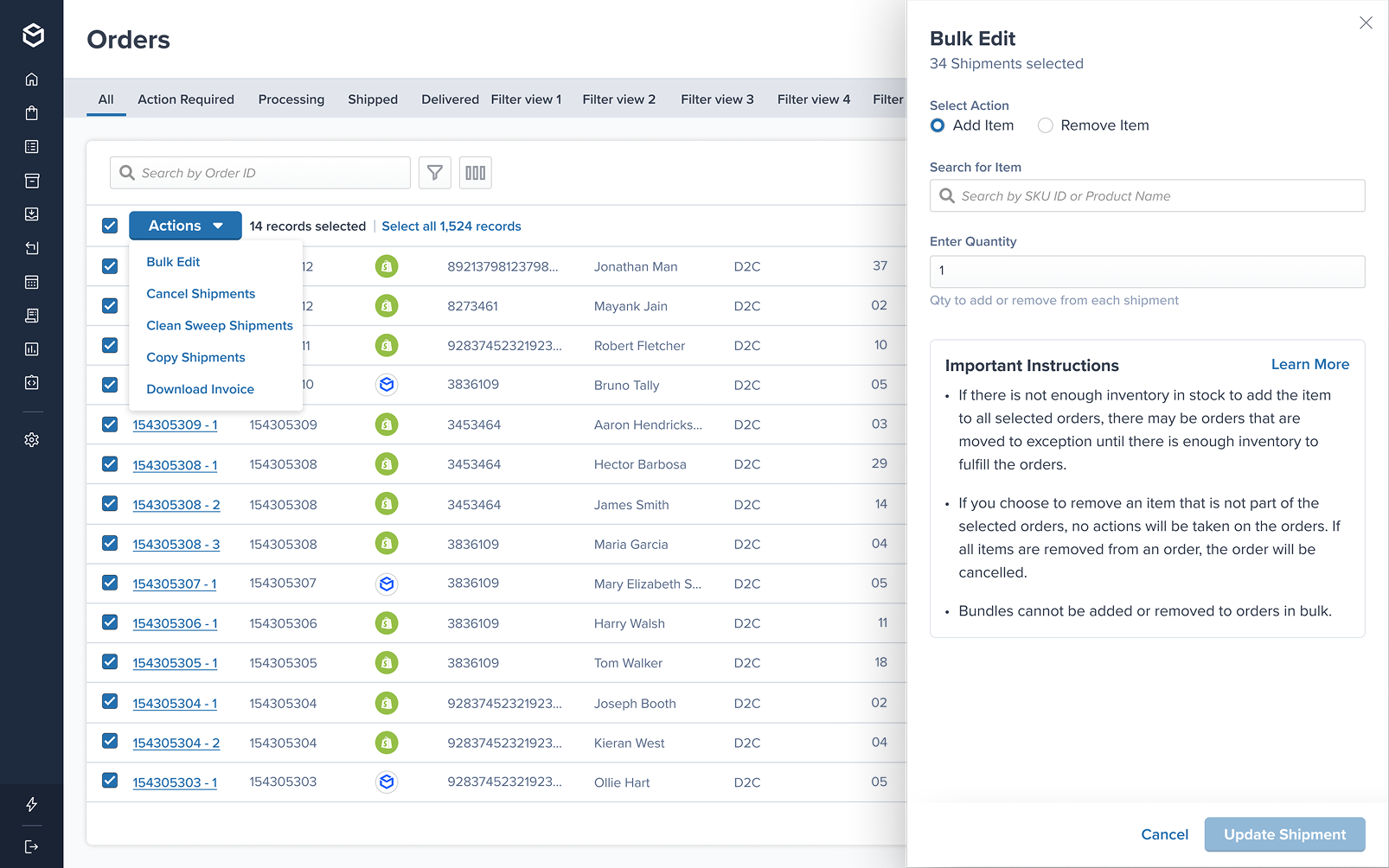
What merchants asked“Improve the scan-ability of order data.”Restructured and regrouped informationColumns, statuses and bulk actions were rebuilt against the new data structure rather than inherited from the old page — source, fulfilment cost, shipment count and SLA surfaced where merchants actually look for them.
Orders list with 14 records selected, Actions menu open and the Bulk Edit drawer showing 34 shipments selected
Regrouped columns, bulk actions and the Bulk Edit drawer
§05ImpactWhat changed for merchants after launch

Measured after GA — live merchant data, not a usability lab. Time to complete common jobs, old page vs new, on the same scale.

Viewing a shipment’s timeline50% faster
Old
78s
New
39s
Submitting an export request52% faster
Old
44s
New
21s
Editing customer information72% faster
Old
96s
New
27s
What merchants said

“I absolutely love the latest update and the new orders page view! It’s a fantastic improvement.”

On seeing the new list page

“I like what you have done with the side panel. I don’t need to go to another tab. The filters are easier to use now.”

On the new shipment drawer and filters

“I don’t need to go to a new page to see this? Tears are coming to my eyes.”

On seeing the new shipment drawer

“I love that page, it’s great. It’s much easier to drill down into stuff.”

On seeing the new list page

“Delivered date is a huge improvement. It couldn’t have come at a better time.”

On seeing the new filter panel

“This was super clutch, it was really helpful.”

On filtering ~8,000 orders affected by a carrier outage
PlatformRebuilt on the new micro-frontend

The order page moved off the legacy PhotoPrint stack onto ShipBob’s new MFE architecture. The backlog of order-management feature requests now has a path to implementation.
§06Next steps & learningsWhat I would carry into the next project
L1Naming is a design decision, and it doesn’t resolve itselfGrouping the exceptions fixed the filtering problem, but participants kept asking what separated “action required” from “attention required” — several assumed one meant exception and the other meant on hold. Structure can be right while the labels are still wrong, and only testing surfaced the gap.
L2Show two versions rather than ask for a preferencePutting both filter panels in front of the same participant, in sequence, produced clear reasoning — less scrolling, live result counts, everything visible at once. Asking what they wanted in the abstract would not have produced that.
L3A rebuild is the moment to fix the foundationMoving the page onto the new micro-frontend wasn’t a visible outcome for merchants, but it is why the next set of feature requests has somewhere to land. Design work that depends on a platform change has to argue for the platform change.
L4Define the measures before launch, not afterAgreeing the KPI set during launch prep meant the beta could be read against something. Waiting until after GA would have left the design investment unquantified.
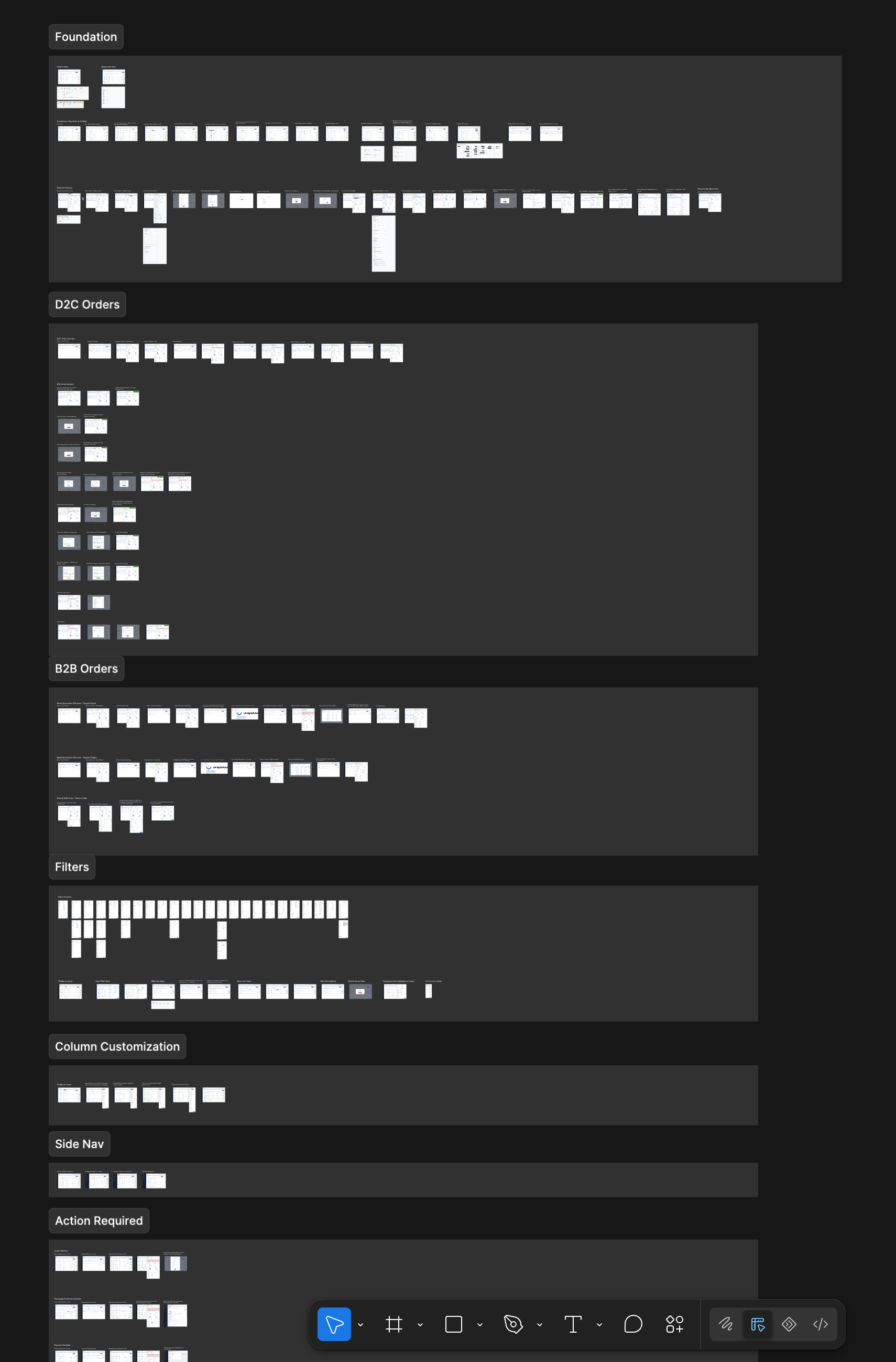
A glimpse of the full scope

This shows a fraction of what shipped. Under NDA I can’t share every design here, but I’d love to walk you through the full project on a call.

Book a walkthrough
View on Behance ↗
The Garage

Side projects and experiments.

Things I build outside client work to try new tools, ideas and ways of designing.
Q.01What do you make on the side?
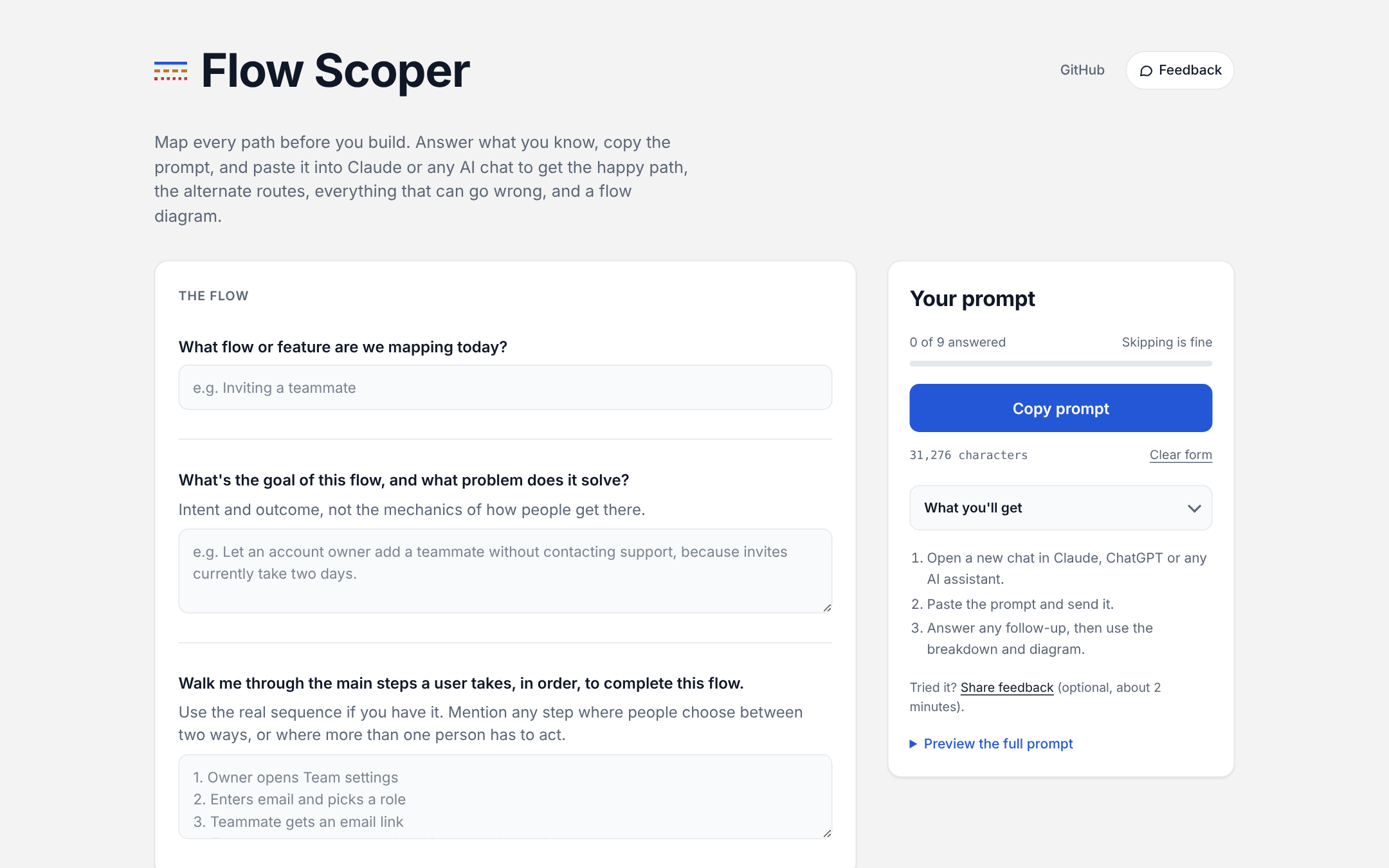
Flow Scoper copy-prompt page 2026 · Exploration · AI-assisted workflow · Live Flow Scoper A free tool that maps every path through a flow before you build it.
Try Flow Scoper ↗
The Garage · Flow Scoper
Flow Scoper
A free tool that maps every path through a flow before you build it.
Walkthrough: form to flow map
RoleDesigner, builder
TypeAI-assisted workflow
StatusLive, free, open on GitHub
The problem

Teams scope the one flow they picture, the happy path. Errors show up as bugs after launch, and alternate routes (a support agent doing it by hand, someone finishing on a phone) already exist in real use but nobody designed them. AI means PMs, founders and engineers now ship features without a designer in the room, and they miss the habit of asking "what else could happen here?"

What I built

An AI skill that works in Claude, ChatGPT, Gemini or any AI chat. It asks eight short context questions, lays out the happy path, finds the alternate routes, and walks a 17-category checklist for what can go wrong, tied to your answers instead of generic errors. It outputs a plain-language breakdown, open design questions and a branching flow diagram.

Making it usable by anyone

Not everyone can install a skill, so I built a copy-prompt page: fill in a short form, copy the prompt, paste it into the AI tool you already use. No install, no sign-up. I tuned it for phones too, with a fixed Copy bar that hides while you type.

Decisions I'd defend
  • Plain language over jargon, so a designer, an engineer and a stakeholder read the same page.
  • Every question is skippable, and the output says which branches stayed generic because of it.
  • Alternate paths are separate from failures, because "another valid way in" and "something broke" need different responses.
Example output

A full example session for an "Invite teammate" flow.

Prompt

Help me scope an "Invite teammate" flow for our B2B SaaS web app. An Admin opens Team settings, enters an email and picks a role (Admin or Member), and the teammate gets an email with a link to join.

Users: workspace Admins (inviting) and invited teammates (new to the product). Web only, US only for now. We use a third-party email service to send invites. Business rules: seats are limited by plan, and invite links expire after 7 days. Known pain point: people say they never got the email.

Invite teammate: Path Map
Happy path
  1. {{ h }}
Alternate paths
{{ a.route }}{{ a.what }}{{ a.status }}
Unhappy paths by step
{{ g.step }}
{{ r.what }}{{ r.show }}
Open design questions
  1. {{ q }}
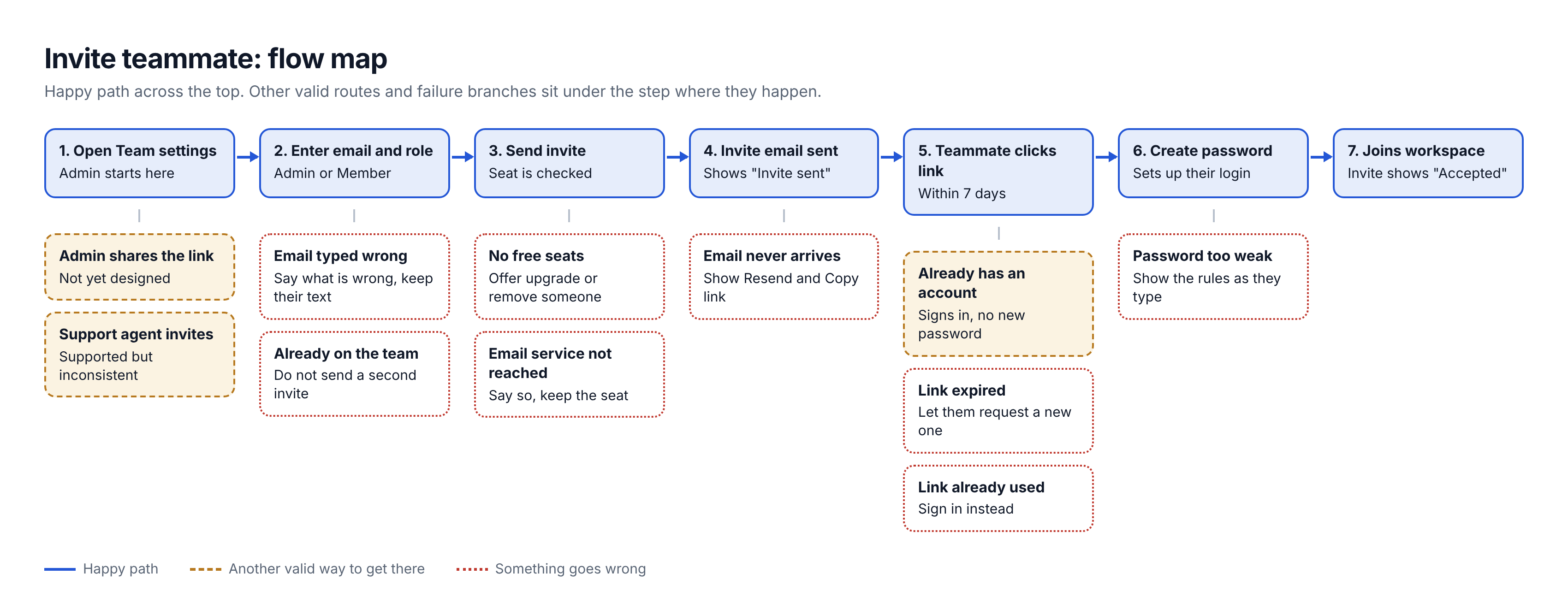
Flow diagram Happy path solid, other valid routes dashed, failures dotted.
Branching flow map for inviting a teammate
Where it lives

All free (CC BY-NC 4.0).

{{ contactQ }}How do I reach you?
mayankjain1717@gmail.com
LinkedIn ↗Behance ↗Resume
© 2026 Mayank JainNew Delhi, India